
Small software is a team sport now
Papr Work 2.7.3 adds Discover, Connections for the tools you use, an Auto model with token tracking per app, and roles for every shared app.
Papr
Teams have shared documents and spreadsheets for twenty years, and everyone knows how that works. A doc has a link, a spreadsheet has an owner, and the edit rights are clear.
The small apps people build with Pen have had none of that. One person builds a deal tracker on a Tuesday. By Friday three teammates want it, but nobody can find it, and nobody knows who may change it.
Developers solved this years ago with GitHub, which gives them a shared repository, pull requests and code review. It works well for developers, but it is complex and it takes time to learn.
A sales lead has the same need to share and improve an app, without first learning branches and merges. In Papr Work we bring a consumer experience to building software, so a team can build apps together the way it edits a shared doc.
This release answers four questions that decide whether a team can use an app. Can people find it and start from it instead of a blank page? Can it work in the tools the team already uses, without wasting tokens on the subscription you pay for? And can each person get the right role?
What we built
Papr Work 2.7.3 adds Discover, a public home for apps that people choose to share, on the desktop and on the web. It adds Connections, so Pen and your apps can work in the tools you already use. It adds an Auto model and an Agents page that shows where your tokens went, app by app. And every shared app now has roles, from someone who only uses it to someone who manages access.
Start from an app that already works
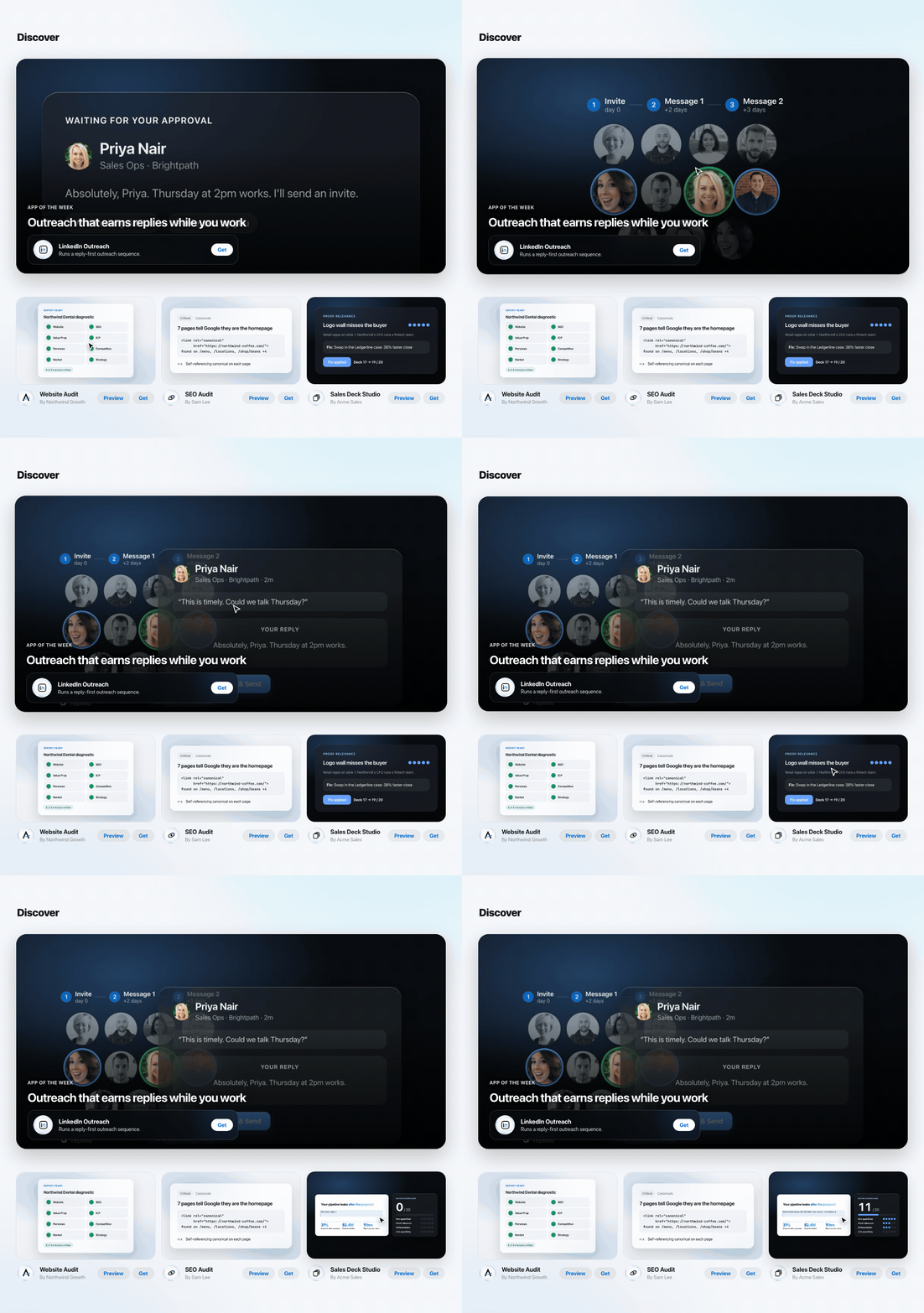
Most apps a team needs already exist in some form, because another sales team has built a deal tracker and another agency has built a website audit. Discover lets you find that app, try it and take your own copy. Then you ask Pen to change it for your team, which is faster than describing a new app from nothing.
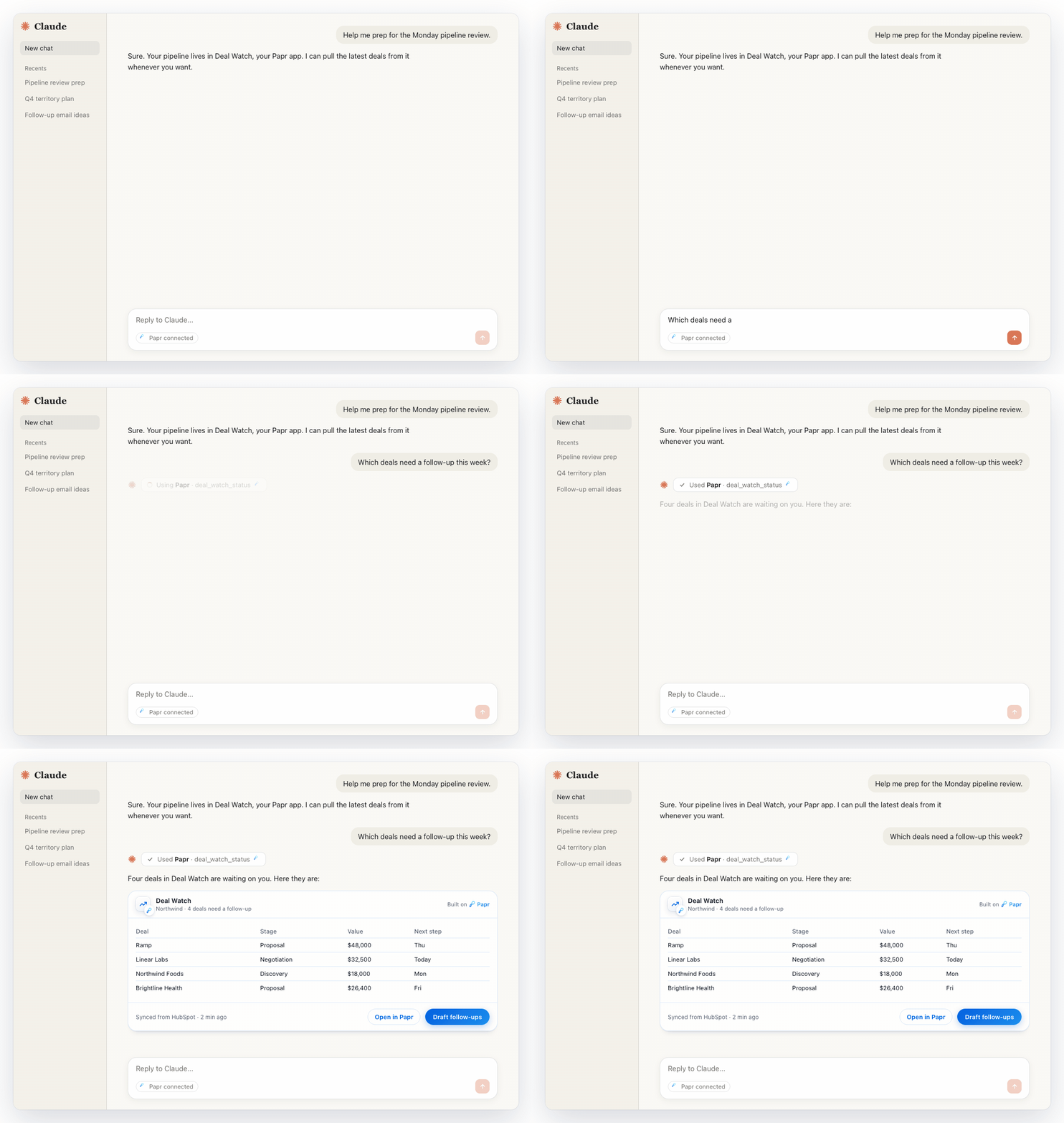
For the builder, Discover gets the app noticed. Each listed app gets its own page on apps.papr.ai that search engines can read, so people find it on Google. Apps also reach people inside Claude. When a teammate adds the Papr connector, Claude can call your app mid-chat and show its card there, with a link back to Papr Work.
A name and a sentence can't show what an app does, so every card shows the app at work. Pen makes a short preview video and a set of screenshots from the app's real screens. The owner comments on them and approves them before anyone sees them.
On Discover a card plays its video only when you point at it, so a page full of apps stays calm. One app gets the featured banner at the top, with a headline its owner writes.
We list only apps whose owners allow others to copy the code, because Discover exists so you can make an app yours. The list is shorter as a result, and we think a short list you can build on beats a long list you can only look at.
Your apps can now work in your other tools
An app that can't reach your real work is a demo. A deal tracker is useful when it reads your HubSpot pipeline, and a weekly report is useful when it pulls last week's tickets from Linear. Until now that took an API key, and most people don't know where to find one.
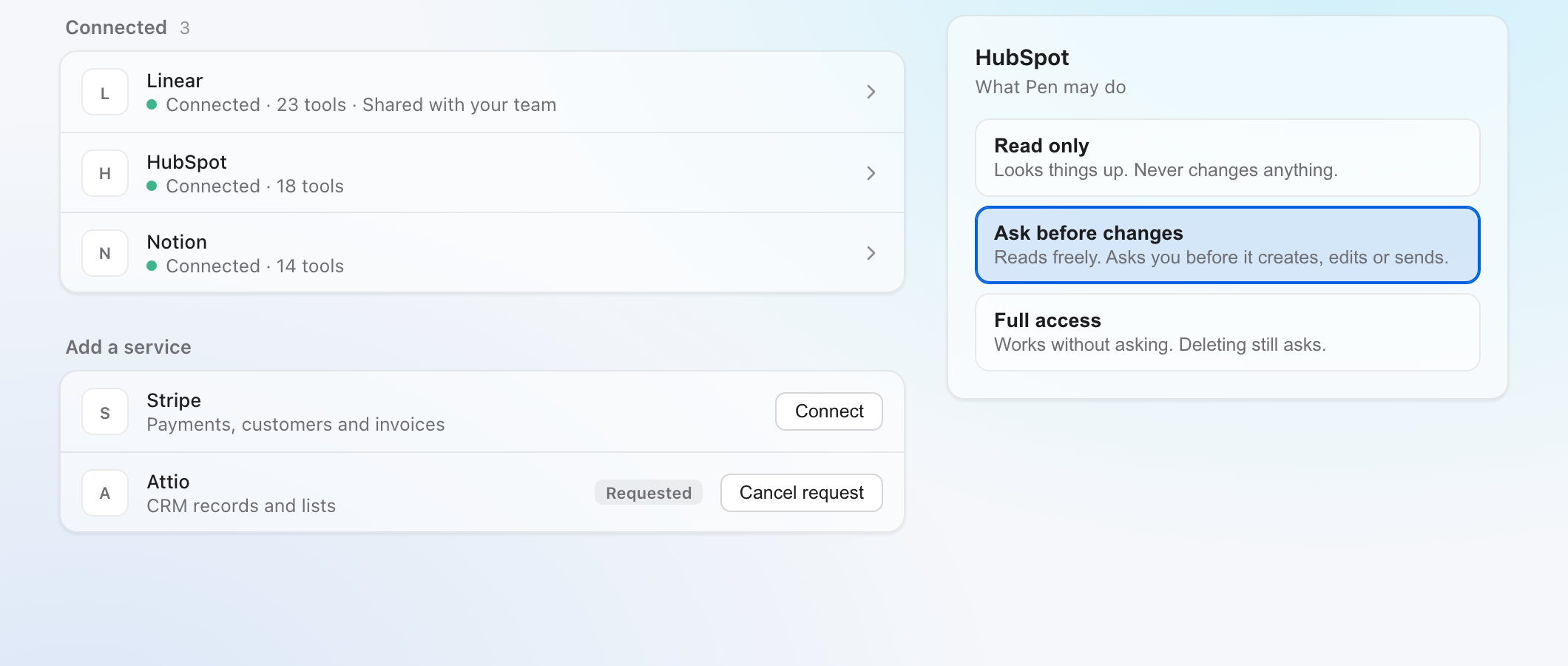
Connections change that. You sign in to a service once, on the same consent screen you see in any other app, and Pen can work there. About fifty services connect this way, from HubSpot and Linear to Notion, Stripe and Asana. Sites without an official connection, like LinkedIn, connect through a sign-in in your own browser.
The same connections work inside the apps you build on the desktop. An app declares the services it uses, you approve each one once, and the app never sees your password. A shared web app that needs Reddit, LinkedIn or X shows each visitor a sign-in row, so it never runs on your login.
Each connection also answers one question in plain words: what may Pen do here? Pen can read only, ask before changes or work with full access, and deleting always asks first.
We made it a dial because trust grows over time, and an admin can set a limit that no member can go past.
Spend tokens like they are your own
Most of what an agent costs is not the writing: when we studied our own usage, re-sending the conversation and its tool results made up more than nine tenths of the cost.
So Papr Work now keeps less in each request: it shortens old tool results, summarizes long threads and searches memory instead of re-reading whole files. In our measurements this cuts token use by up to 90% compared with sending everything.
The new Auto model decides before each message whether it needs a quick model, an ordinary one or the strongest one. A greeting doesn't need the model you'd use to redesign an app. When Auto is unsure it picks the stronger model, because an answer you have to redo costs more.
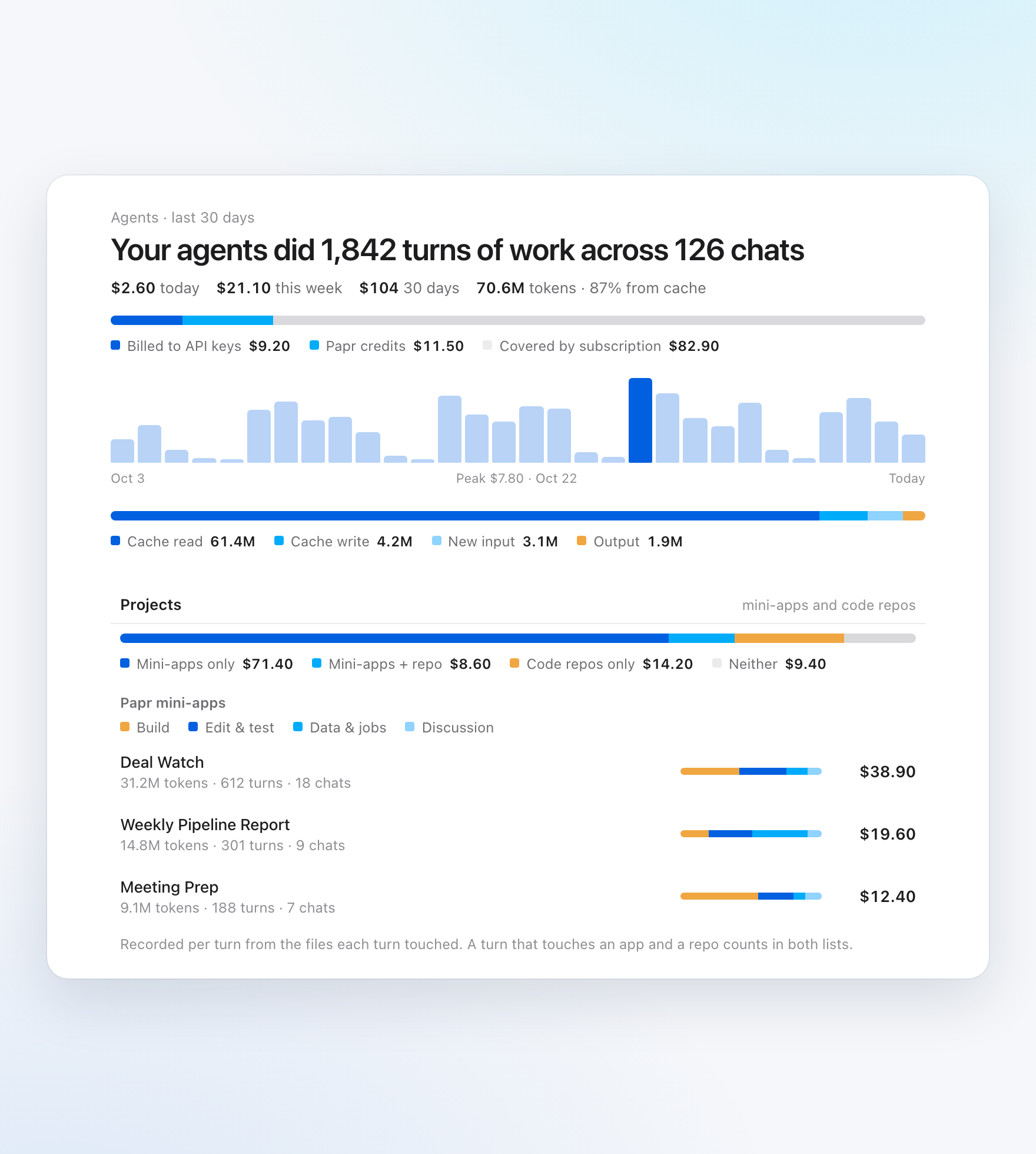
Most people already pay for Claude or ChatGPT, so Papr Work uses that subscription first. The Agents page shows how much of your work the subscription covered, and how much went to API keys or Papr credits. It also shows the tokens and cost for each app, so you can see that Deal Watch took most of this month. When one app costs more than it should, you know where to look before the bill arrives.
Using an app and changing it are different jobs
At work, most people who use an app should not change it. The sales team uses Deal Watch every day, one analyst improves it, and the team lead decides who gets access. A share link alone can't tell these people apart, so every shared app now has four roles:
- Viewer: uses the app.
- Contributor: proposes changes, which someone approves.
- Maintainer: approves proposals and publishes changes.
- Admin: also manages who has access.
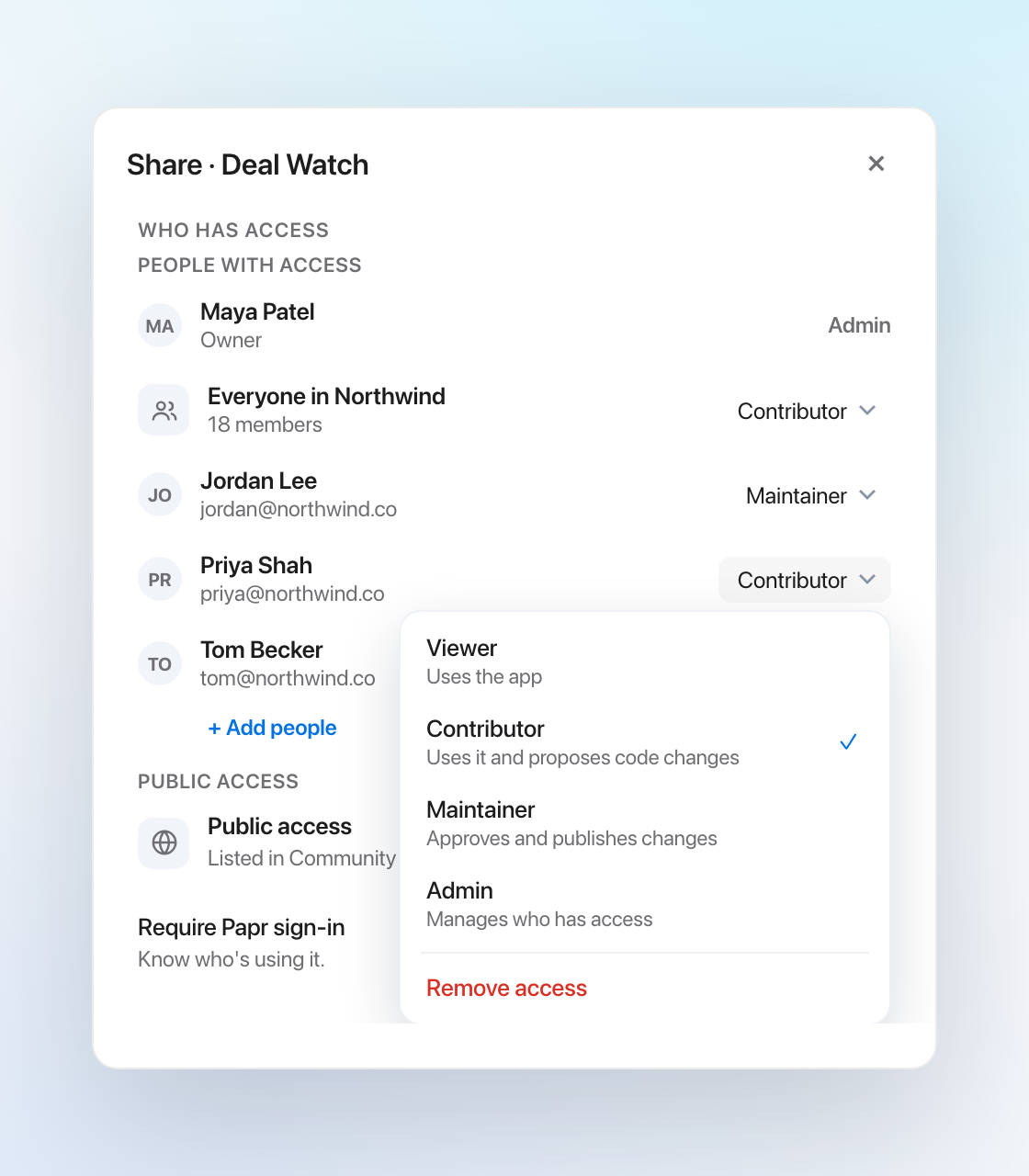
We took these roles from GitHub, where they have worked for years, and added Viewer for people who never need the code. A Contributor's change works like a pull request without the vocabulary. Pen first brings in the latest version of the app, so a proposal never overwrites someone else's work.
Each audience has a highest role. Your whole workspace can get up to Maintainer, but Admin is always a decision about one named person. People from Discover or a public link can get up to Contributor, so a stranger can suggest a fix but never publish one.
Roles reach the data too. An owner can make a table private and show each row to one role, one person or one project group. When someone joins that project, they see its rows, and nobody rewrites the data.
Safer by default
A few changes don't show on screen but matter. The local service that runs your apps now listens only on your own computer, so other devices on your network can't reach it. You can install any published app from Chrome or Edge as its own app in your Dock. And Pen can now make video with Gemini Omni, turning a first and a last frame into one clip.
What you can do now
- Find an app on Discover and ask Pen to change it, or get your own app noticed there.
- Connect HubSpot, Linear, Notion and about fifty other tools.
- See what each app cost on the Agents page, and let Auto pick the model.
- Give each person a role on each shared app, and keep private rows private.
What we learned
Sharing was never one feature. It is four answers that have to agree: where people find an app, what it may touch, what it costs and who may change it. Next, we'll make setup clearer for apps that need more than one account.
Update to Papr Work 2.7.3 to try it.