
LinkedIn Outreach: Spend Your Time on Clients, Not a New Side Project
Papr Work's LinkedIn Outreach app gives small GTM teams prospects, sequences, follow-ups and a reply inbox on day one, with no automation to build.
Corey Badcock
You Wanted More Client Conversations, Not a New Side Project
AI can now build almost anything you can describe. AI agents and coding tools can wire together a LinkedIn outreach system for you.
But someone still has to design it. Where do prospects live? How does it know an invitation was accepted? What happens when a follow-up fires twice, or LinkedIn changes something? For a solo consultant, that someone is you, and every hour spent there is an hour not spent with clients or prospects.
As we wrote when we launched Papr Work, people adopted AI to move faster, yet many are still the glue between their tools. Swapping “manage five tools” for “build and maintain your own automation” is not much of an upgrade.
Papr Work is a local-first platform for personalizing small software that runs your work. It is built for founders, marketers, account managers, and independent professionals who want leverage from AI without building software themselves.
Papr Work starts from the outcome instead. Community apps, built by the Papr team and by Papr Work users, give you a faster starting point than building from scratch. Run one as provided, adapt it through chat, or use it as the foundation for something specific to your business. LinkedIn Outreach is one of them: prospects, sequences, follow-ups, and a reply inbox, working before you have written a single instruction.
What LinkedIn Outreach Does
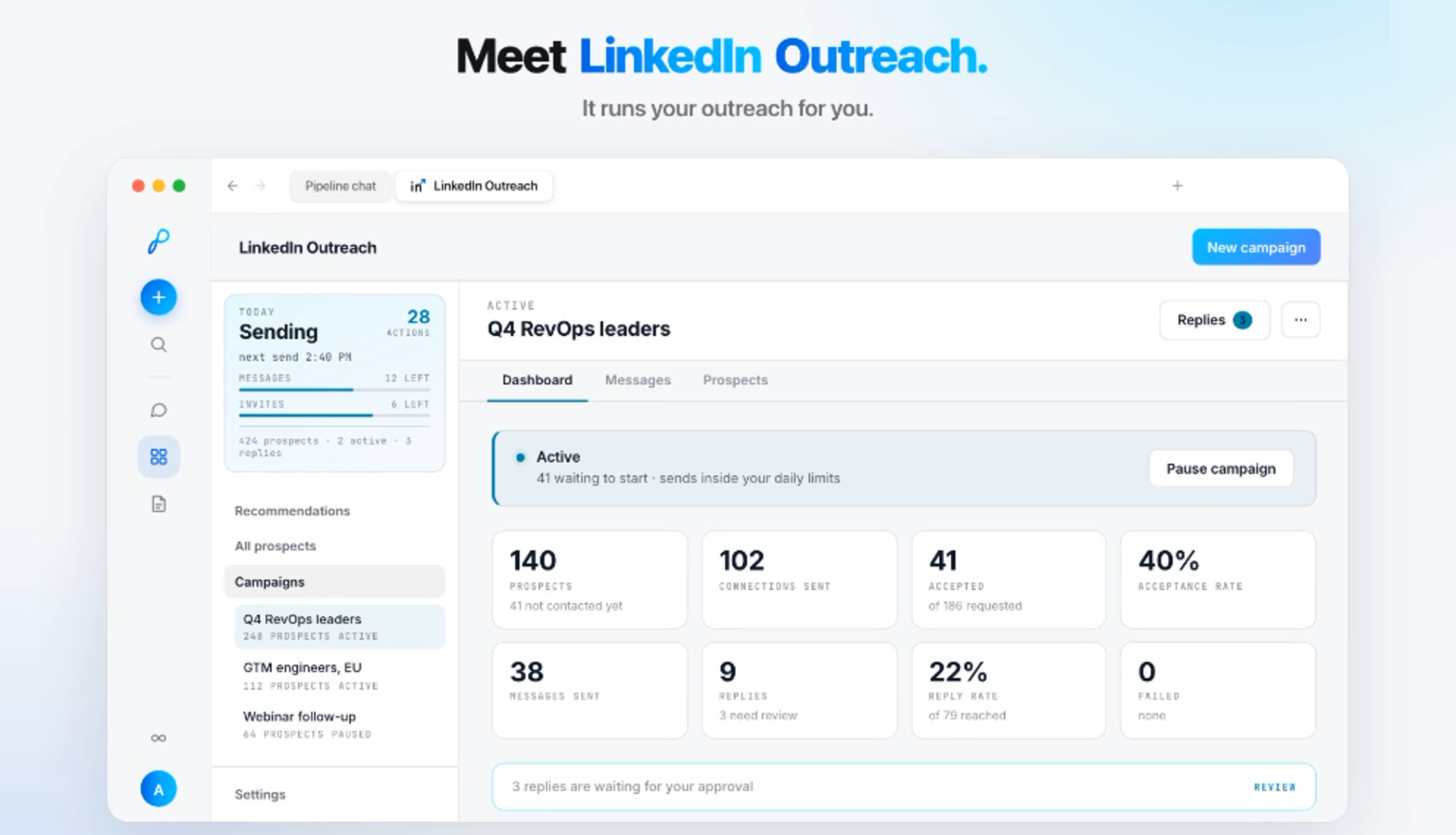
LinkedIn Outreach runs multi-step campaigns through your own LinkedIn account. You choose who to contact and what to say. The app tracks who accepted, sends the next step on time, and collects replies in one inbox.
It is built for people who do their own outbound and have no time to babysit it:
Independent consultants and fractional executives starting conversations with potential clients between engagements.
Founders looking for their first customers.
Small go-to-market teams that need one consistent process, not a stack of tools and a spreadsheet.
When client work fills my week, outreach is the first thing to slip. Messages sit in an AI chat, names in a spreadsheet, invitations in LinkedIn, and follow-ups in my head. I could build my own automation with an AI agent, but that is time I would rather spend with clients.
With LinkedIn Outreach, I add the people I want to reach, write a connection request and a couple of short follow-ups, and I am off and running in under an hour. While I work with clients, the app tracks acceptances and sends follow-ups on schedule. When someone replies, I ask AI for a draft, edit it, and send it. I still decide who is a fit and which conversations are worth a meeting. I just stopped being the system that remembers what happens next.
Getting Started Is Easy
You don’t have to design a database, configure triggers, or explain a workflow to an AI agent. The app already does that work, so setup comes down to the decisions only you can make: who to reach and what to say. You can go from install to a running campaign in under an hour.
Install Papr Work and the app. Download Papr Work, open Community Apps, and install LinkedIn Outreach. It is included in your Papr Work plan.
Connect your LinkedIn account. Campaigns run through the profile you already use, so prospects hear from you, not a shared sender.
Add your prospects. Paste LinkedIn profile URLs, paste CSV data (name, LinkedIn URL, company, title), or drop in a LinkedIn or Sales Navigator search URL and let the app turn it into prospects within its activity budget. You still decide who is a fit.
Write your sequence. A connection request plus follow-ups, with the delay between each. Fields like first name, company, and headline personalize each message.
Let it run. Follow-ups wait for the connection to be accepted, and the first delay is counted from acceptance, not from when you sent the invite. Send windows and activity caps pace everything so it looks like you, working normally.
Handle replies yourself. When someone responds, it lands in the reply inbox. Write your answer, or click Draft with AI, edit it, and choose Approve & Send. Sequence steps run automatically; conversational replies never go out without your approval. Drafts draw on the business context Papr Work already holds, so they start closer to how you would answer.
Why Start With an App Instead of Building It Yourself?
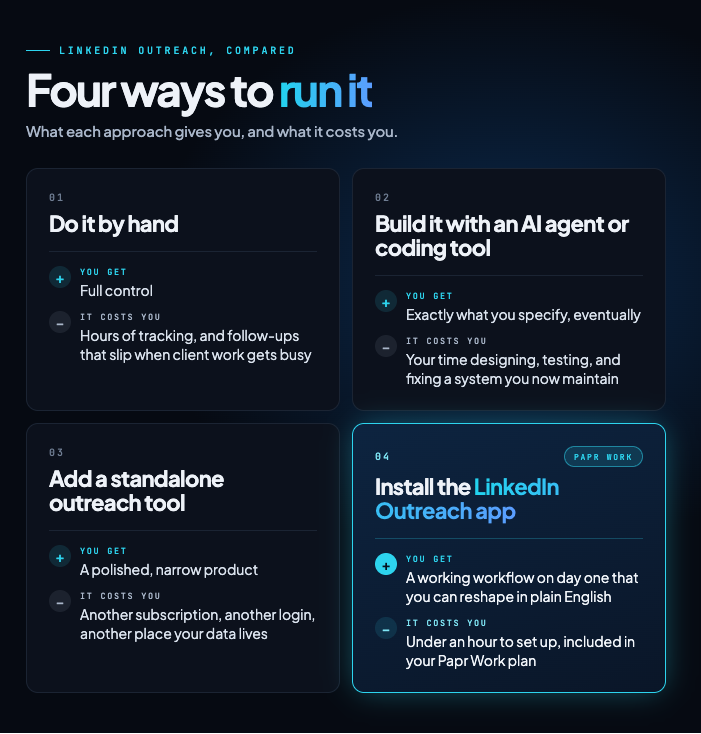
Starting with an app gets you the outcome without the overhead. You keep the control of running outreach yourself, skip the work of building and maintaining your own automation, and avoid paying for another narrow tool. And because Papr Work keeps context about your business, the app gets more useful the longer you use it. The graphic compares the four options, and the notes below walk through each one.
Versus doing it by hand. Your edge is knowing why your offer matters to this person and when to take the next step. Checking acceptance status and remembering follow-up dates use none of that. The app handles the repetition; you handle relevance, tone, and the relationship.
Versus building it with an AI agent or coding tool. Building from scratch forces decisions about prospect records, connection tracking, timing, and reply handling before you send a single message. The app has made those decisions already. When you want something different, like a separate sequence for warm intros or different follow-ups for founders and executives, you describe the change and Papr Work adapts the app. You get a custom workflow without becoming its engineer.
Versus adding another outreach tool. LinkedIn Outreach is included in your Papr Work plan at no extra cost. Instead of adding another point solution to an already fragmented stack, you run the workflow alongside the rest of your work. A dedicated platform can make sense for teams with specialized needs, but you can start with the job you need done and decide later whether you need more.
And it gets more useful over time. Papr Work gives apps persistent business context: customer history, preferences, terminology, and past decisions. In LinkedIn Outreach, that means Draft with AI writes replies that already know your business background, like what you offer and how you describe it, so you spend less time rewriting. Reusing that context instead of resending it keeps AI costs down too.
Run the Outcome, Skip the Build
You did not start a consulting practice to maintain automation. LinkedIn Outreach is one example of what Papr Work is for: begin with an app that already does the job, shape it to your business in plain language, and put your hours back into clients. Less coordination, fewer subscriptions, and more output without adding headcount.
Download Papr Work, open Community Apps, and install LinkedIn Outreach. Your first campaign can be running before your next client call.
Questions
What is the LinkedIn Outreach app?
A ready-made Papr Work app that runs multi-step LinkedIn campaigns from your own account, with prospects, sequences, follow-ups and a reply inbox.
Who is it for?
Solo consultants and small GTM teams who want more client conversations without building and maintaining an outreach automation.
Does it send from my account?
Yes. Campaigns run through your own LinkedIn account, and replies arrive in one inbox in Papr Work.